Search Articles
Product Series Filter
Articles
MixPre Comparison Chart
Feature MixPre-3M MixPre-3 MixPre-6M MixPre-6 MixPre-10M MixPre-10T Tracks 12 (max 3 at once) 5 (3 + LR mix) 12 (max 6 at once) 8 (6 + LR mix) 12 (max 8 at once) 12 (10 + LR mix) Balanced Mic/Line Inputs 3 XLR 3 XLR 4 XLR/TRS combo 4 XLR/TRS combo 8 XLR/TRS combo 8 […]
Read The Full ArticleLegacy Approved Media – PIX 250i, PIX 260i, PIX 270i
The following is a list of approved storage devices for use with the PIX 250i, PIX 260i and PIX 270i video recorder. The specific mechanisms and devices below have been extensively tested by Sound Devices, LLC. This list is regularly updated as new drives are tested. 2.5″ SSD Size Brand Model 960 GB SanDisk Extreme PRO […]
Read The Full ArticleA-FLIP Installation
The A-FLIP is a SuperSlot adapter that changes the orientation of an A10-RX in an SL-6 or A10-RACK The instructions below describe installation of the A-FLIP adapter Before starting please make note of the following: Supplies Required A Phillips head screwdriver The A-FLIP uses the screws already installed in the A-SL Four M2.5×0.45 16mm screws […]
Read The Full ArticleServicing Audio Ltd Analog Products
All Audio Ltd analogue products are serviced through the factory authorised service centres listed below: Audio Related Technology LtdPrimary UK Authorised Service Centre 5 Phoenix Business CentreCheshamHP5 2AJTel: 01494 794 286 URL: www.audiorelated.comEmail: [email protected] Everything Audio LtdUK Authorised Service Centre Elstree Film StudiosShenley RoadBorehamwoodHertsWD6 1JGTel: 020 8324 2726 URL: www.everythingaudio.co.ukEmail: [email protected] VDB AudioAuthorised Service Centre – France 4 Rue […]
Read The Full Article
A-FILTER Installation
The A-FILTER for Balanced Microphones adds RF immunity for microphones, specifically when connected to digital wireless transmitters like the A10-TX. The instructions below describe how to mount the A-FILTER for Balanced Microphones into a female XLR connector. Before starting please make note of the following: The A-FILTER should be placed as close to the microphone as […]
Read The Full Article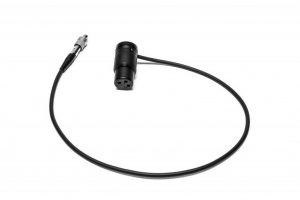
Eliminating RF-Induced Microphone Noise
Using older, balanced microphones with the A10 Digital Wireless System can lead to unwanted noise. Although the inputs on the A10 System are fully protected from radio frequency interference, older microphones themselves are sensitive to RF. Here are a few solutions to remove the unwanted noise being picked up by your older microphone: Sending your […]
Read The Full Article