Search Articles
Product Series Filter
Articles
SOUNDDEV Folder in 7-Series Storage Volumes
Storage volumes formatted by 7-Series recorders generate three folders in the volume’s root. These folders are named FALSETAKES, TRASH, and SOUNDDEV. The FALSETAKES and TRASH folders can be viewed and emptied from the 7-Series recorder. The SOUNDDEV folder is hidden and cannot be accessed from the 7-Series recorder; it is only visible when the storage […]
Read The Full Article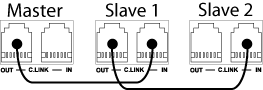
Linking Multiple 7-Series Recorders Using C. Link
Sound Devices 7-Series recorders are equipped with a proprietary C. Link (control link) 6-pin modular input and output connections. These connections allow multiple 702, 702T, 722, and 744T recorders to be daisy-chained together for recordings requiring high track counts.
Read The Full ArticlePower Consumption of 7-Series Recorders
Power consumption varies when using a 7-Series Recorder. The chart below shows the power consumption of a 744T recorder in several configurations.
Read The Full ArticleSample Rate and Frame Rate Settings for Production Sound
Q: What sample rate & frame rate should I set my 702T/744T to when recording sound for picture?
Read The Full Article
302 Input and Output Panel Descriptions
The chart below describes the inputs and output panels of the Sound Devices 302 Compact Field Mixer, including functionality and pin configurations.
Read The Full Article
The “Five Channel” 302 Mixer
The 302 has three full-featured inputs, selectable between mic and line level. When additional inputs are needed, such as for additional wireless receivers or for stereo playback, the 3.5 mm Return connector can be reassigned as an input connector for channels 4 and 5. This feature is selected in the Setup Menu.
Read The Full Article